Developer Hooks for Packing Station for WooCommerce.
Packing Station exposes a focused set of WordPress actions and filters so developers can adapt the order feed, print payload, staff access, and workflow events without forking the plugin.
Extension approach
Controlled extension points, not a fork.
The hooks are intended for store-specific customisations such as adding delivery data to prints, limiting the order feed, reacting when staff complete an order, or adjusting access rules for a particular operation.
Custom code should live in a small site plugin or child-theme helper, not directly inside Packing Station. That keeps updates clean while preserving the custom workflow.
- Order feed Adjust WooCommerce order queries or add optional data to prepared order responses.
- Print payload Add fields or sections sent to the Android Print App while keeping required core keys intact.
- Workflow events React to completed orders, stock status updates, and emergency order pause or resume changes.
Hook reference
Available actions and filters.
All hook names use the psfw_ prefix.
| Hook | Type | Arguments | Purpose |
|---|---|---|---|
psfw_order_feed_query_args |
Filter | $args, $context |
Adjust the wc_get_orders() query for order feed endpoints. |
psfw_order_feed_order_data |
Filter | $order_data, $order, $context |
Add or modify one prepared order object before it is returned by the REST API. |
psfw_print_field_registry |
Filter | $registry |
Register additional selectable fields in WooCommerce > Packing Station. |
psfw_enabled_print_fields |
Filter | $fields, $context |
Adjust the final enabled field keys after saved settings or defaults are loaded. |
psfw_print_payload |
Filter | $payload, $order, $context |
Customize the order payload consumed by the Android companion app. |
psfw_print_payload_required_keys |
Filter | $required, $context, $order |
Adjust the required payload keys restored after psfw_print_payload. |
psfw_user_can_access |
Filter | $allowed, $user_id, $area |
Customize access to order_feed, order_control, or stock_control. |
psfw_order_datetime_format |
Filter | $format |
Customize the full order date/time format used in order payloads. |
psfw_order_card_datetime_format |
Filter | $format |
Customize the compact order date/time format used on order cards. |
psfw_order_status_update_allowed |
Filter | $allowed, $order, $new_status, $user_id |
Allow or block a staff-triggered status update. |
psfw_after_order_status_update |
Action | $order_id, $old_status, $new_status, $user_id |
Run logic after Packing Station changes an order status. |
psfw_after_stock_status_update |
Action | $product_id, $new_status, $user_id, $old_status |
Run logic after stock status is changed from Stock Control. |
psfw_after_order_control_change |
Action | $is_paused, $user_id, $reason |
Run logic after emergency order pause or resume changes. |
psfw_companion_app_config |
Filter | $config, $context |
Add small front-end or app config values exposed through PSCFG. |
Print payload safety
Developers can customize the Android print payload with psfw_print_payload. After that filter runs, the plugin restores required core keys where possible so the Print App still receives the minimum structure it expects.
idstatusitemscreated_fullcreated_card_sections
Where to put custom code
Best practice is to put hook callbacks in a small custom plugin for the store. That keeps custom behaviour separate from Packing Station itself, so plugin updates do not overwrite local work.
Many developers also add short hook callbacks to a child theme's functions.php file. That can work, but the code is then tied to the active theme and may stop running if the store changes theme. Avoid editing a parent theme's functions.php, because theme updates can overwrite it.
For smaller changes, a trusted code-snippet plugin can also be used. For example, Code Snippets lets site owners manage PHP snippets from the WordPress admin without editing theme files.
Avoid removing core payload data unless you have also updated the consuming Android print workflow to understand the change.
Examples
Common customisations.
Add a selectable delivery slot field
This adds an order meta field to the admin field registry, then adds it to the payload when that field is enabled.
add_filter( 'psfw_print_field_registry', function ( $registry ) {
    $registry['delivery'] = [
        'label'  => __( 'Delivery', 'my-plugin' ),
        'fields' => [
            'delivery_slot' => __( 'Delivery Slot', 'my-plugin' ),
        ],
    ];

    return $registry;
} );

add_filter( 'psfw_print_payload', function ( $payload, $order, $context ) {
    if ( empty( $context['enabled_fields'] ) || ! in_array( 'delivery_slot', $context['enabled_fields'], true ) ) {
        return $payload;
    }

    $slot = $order->get_meta( '_delivery_slot' );
    if ( '' === $slot ) {
        return $payload;
    }

    $payload['delivery_slot'] = $slot;
    $payload['_sections'][] = [
        'key'    => 'delivery',
        'label'  => __( 'Delivery', 'my-plugin' ),
        'fields' => [
            [
                'key'   => 'delivery_slot',
                'label' => __( 'Delivery Slot', 'my-plugin' ),
                'value' => $slot,
            ],
        ],
    ];

    return $payload;
}, 10, 3 );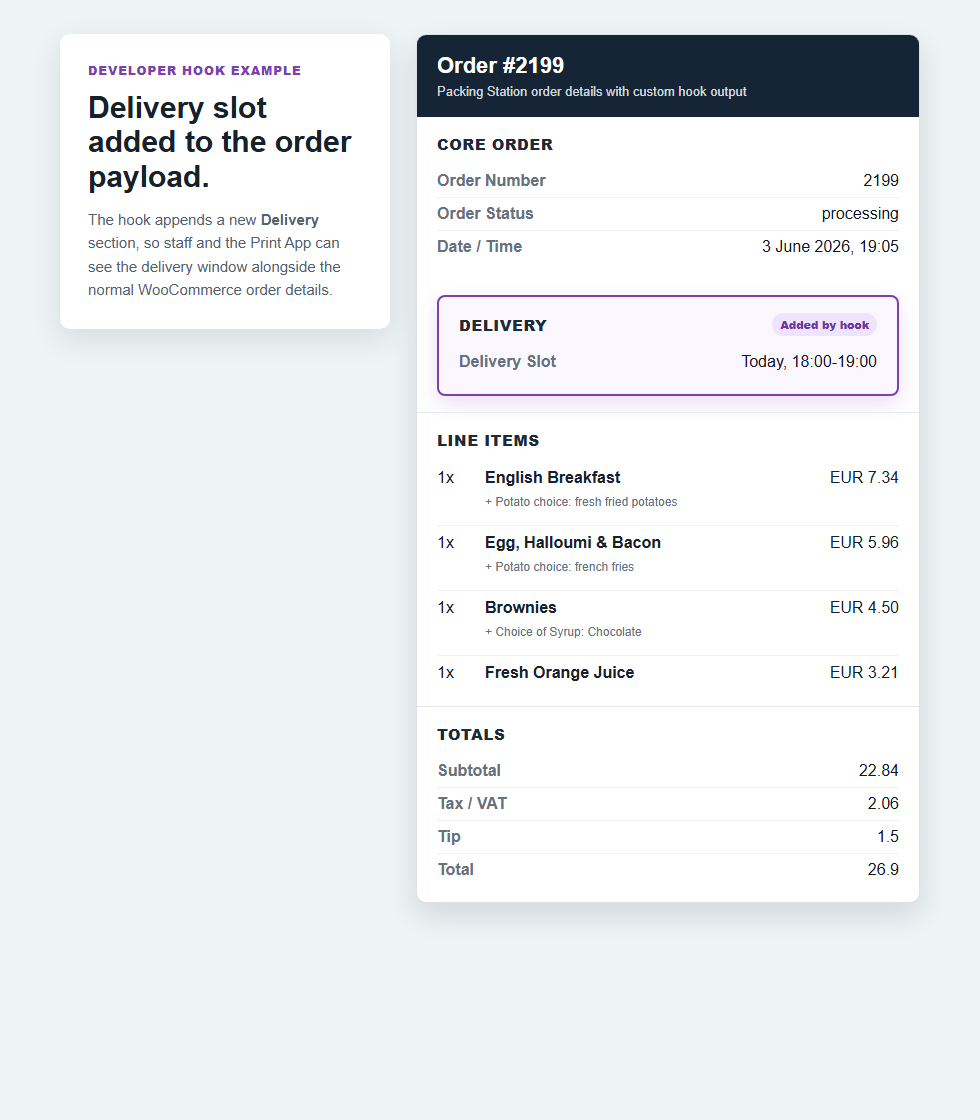
Add a receipt heading and thanks message to prints
This prepends a receipt-style section to the Android print payload. It is useful when the printed order list is included with a packed order or customer collection bag.
add_filter( 'psfw_print_payload', function ( $payload, $order, $context ) {
    if ( empty( $payload['_sections'] ) || ! is_array( $payload['_sections'] ) ) {
        $payload['_sections'] = [];
    }

    array_unshift( $payload['_sections'], [
        'key'    => 'receipt',
        'label'  => __( 'Receipt', 'my-plugin' ),
        'fields' => [
            [
                'key'   => 'receipt_message',
                'label' => __( 'Message', 'my-plugin' ),
                'value' => __( 'Received with thanks.', 'my-plugin' ),
            ],
            [
                'key'   => 'payment_status',
                'label' => __( 'Payment', 'my-plugin' ),
                'value' => $order->is_paid() ? __( 'Paid', 'my-plugin' ) : __( 'Payment pending', 'my-plugin' ),
            ],
        ],
    ] );

    return $payload;
}, 10, 3 );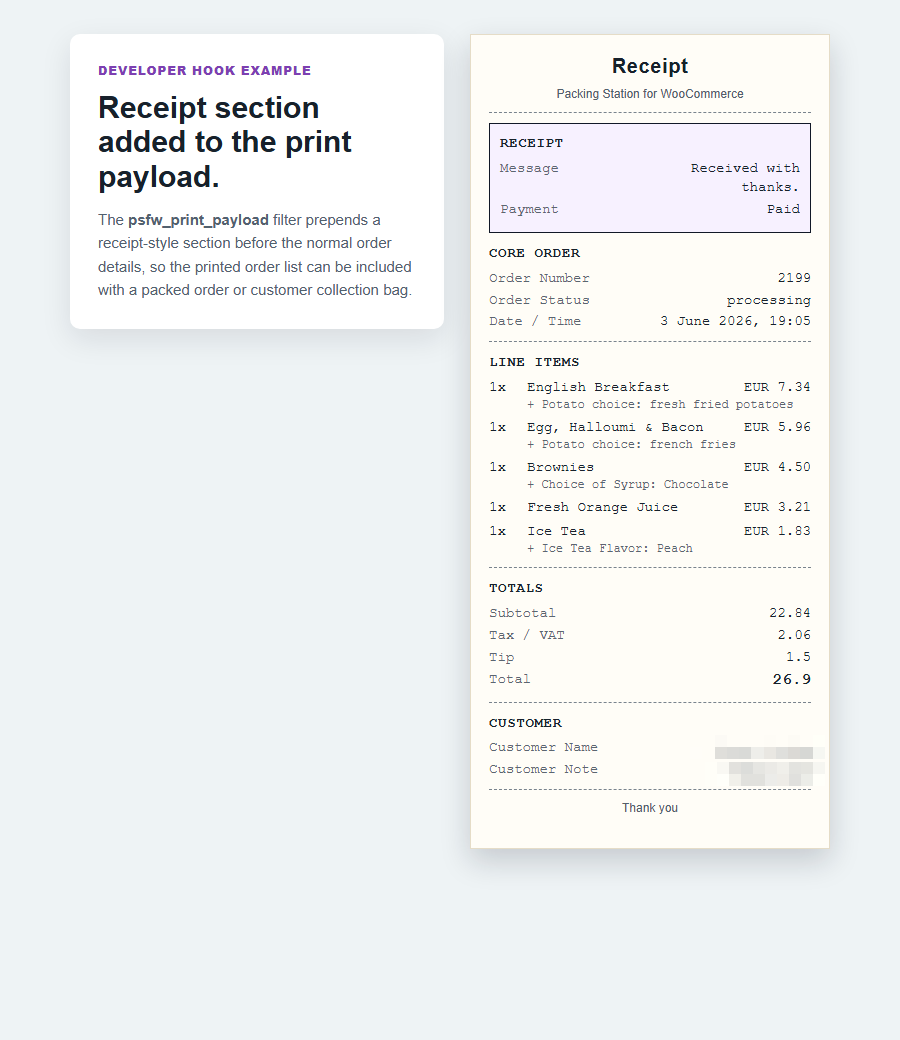
Limit the feed to collection orders
add_filter( 'psfw_order_feed_query_args', function ( $args, $context ) {
    $args['meta_query'][] = [
        'key'   => '_order_type',
        'value' => 'collection',
    ];

    return $args;
}, 10, 2 );
Notify another system when staff complete an order
add_action( 'psfw_after_order_status_update', function ( $order_id, $old_status, $new_status, $user_id ) {
    if ( 'completed' !== $new_status ) {
        return;
    }

    // Send a webhook, write an audit log, or notify a fulfilment system.
}, 10, 4 );
Restrict Stock Control to managers
This keeps the order feed available to Packing Station staff, but limits the stock screen to users who can manage WooCommerce.
add_filter( 'psfw_user_can_access', function ( $allowed, $user_id, $area ) {
    if ( 'stock_control' !== $area ) {
        return $allowed;
    }

    return user_can( $user_id, 'manage_woocommerce' );
}, 10, 3 );
Block completion for unpaid orders
This prevents staff from marking an order complete from Packing Station if WooCommerce still considers the order unpaid.
add_filter( 'psfw_order_status_update_allowed', function ( $allowed, $order, $new_status, $user_id ) {
    if ( 'completed' !== $new_status ) {
        return $allowed;
    }

    if ( $order->needs_payment() ) {
        return false;
    }

    return $allowed;
}, 10, 4 );
Add a large-order flag to the feed and print payload
This adds a simple operational flag when an order contains ten or more total items.
add_filter( 'psfw_order_feed_order_data', function ( $payload, $order, $context ) {
    $item_count = 0;

    foreach ( $order->get_items() as $item ) {
        $item_count += (int) $item->get_quantity();
    }

    if ( $item_count >= 10 ) {
        $payload['large_order'] = true;
        $payload['_sections'][] = [
            'key'    => 'operations',
            'label'  => __( 'Operations', 'my-plugin' ),
            'fields' => [
                [
                    'key'   => 'large_order',
                    'label' => __( 'Large Order', 'my-plugin' ),
                    'value' => __( 'Check packing capacity', 'my-plugin' ),
                ],
            ],
        ];
    }

    return $payload;
}, 10, 3 );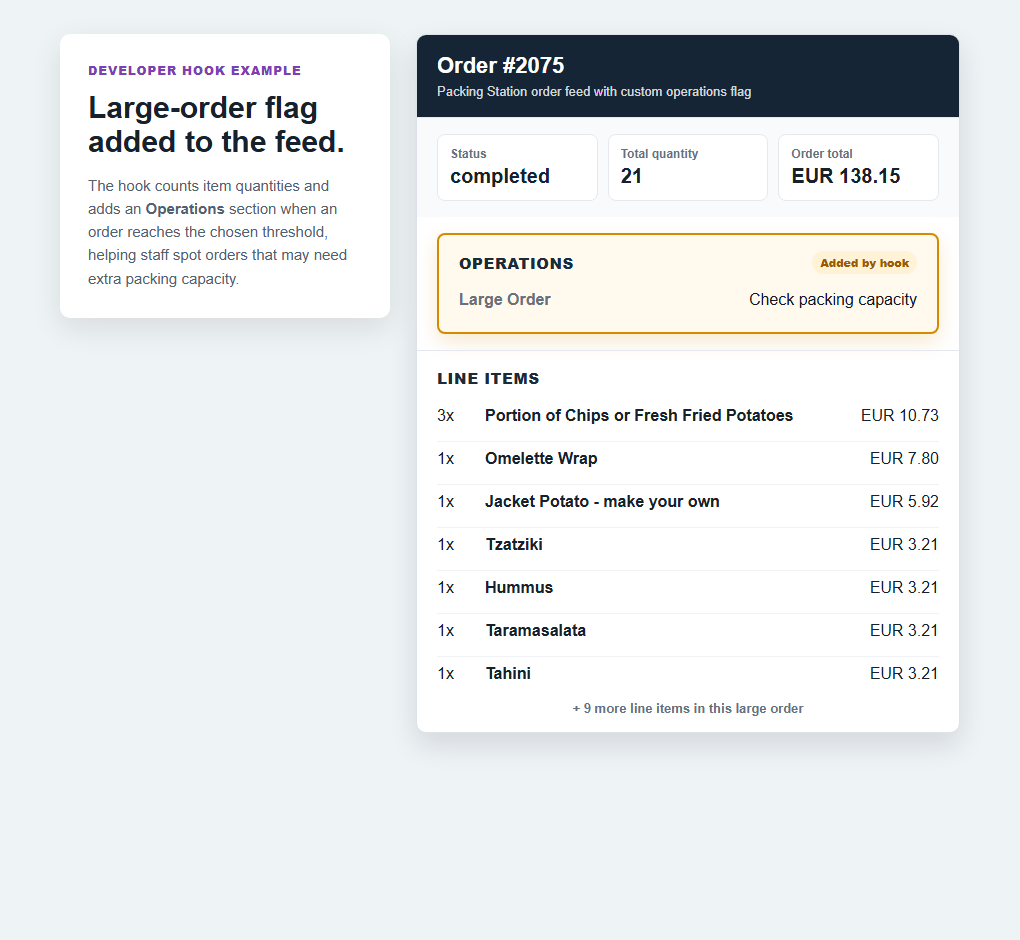
Log stock changes made from Stock Control
This writes a WooCommerce log entry whenever staff change product stock status from the Packing Station screen.
add_action( 'psfw_after_stock_status_update', function ( $product_id, $new_status, $user_id, $old_status ) {
    if ( $new_status === $old_status ) {
        return;
    }

    wc_get_logger()->info(
        sprintf(
            'Packing Station stock change: product %d changed from %s to %s by user %d.',
            $product_id,
            $old_status,
            $new_status,
            $user_id
        ),
        [ 'source' => 'packing-station' ]
    );
}, 10, 4 );
Use a shorter date format on order cards
This changes the compact date shown in card-style order data without changing the full date value.
add_filter( 'psfw_order_card_datetime_format', function ( $format ) {
    return 'd M, H:i';
} );
Add a small front-end config value
This exposes a custom station label through PSCFG.stationName for site-specific JavaScript or App-aware customisations.
add_filter( 'psfw_companion_app_config', function ( $config, $context ) {
    if ( ! empty( $context['is_order_feed'] ) ) {
        $config['stationName'] = 'Kitchen pass';
    }

    return $config;
}, 10, 2 );
Related pages
Use hooks when the base workflow needs a local adjustment.
For the general product overview, start with the plugin page. For installation and setup, use the support page.